What's new in Tymeslot 1.12 to 1.15: booking approval, Microsoft Exchange, and your own booking page welcome

17 września 2026 · 7 min czytania
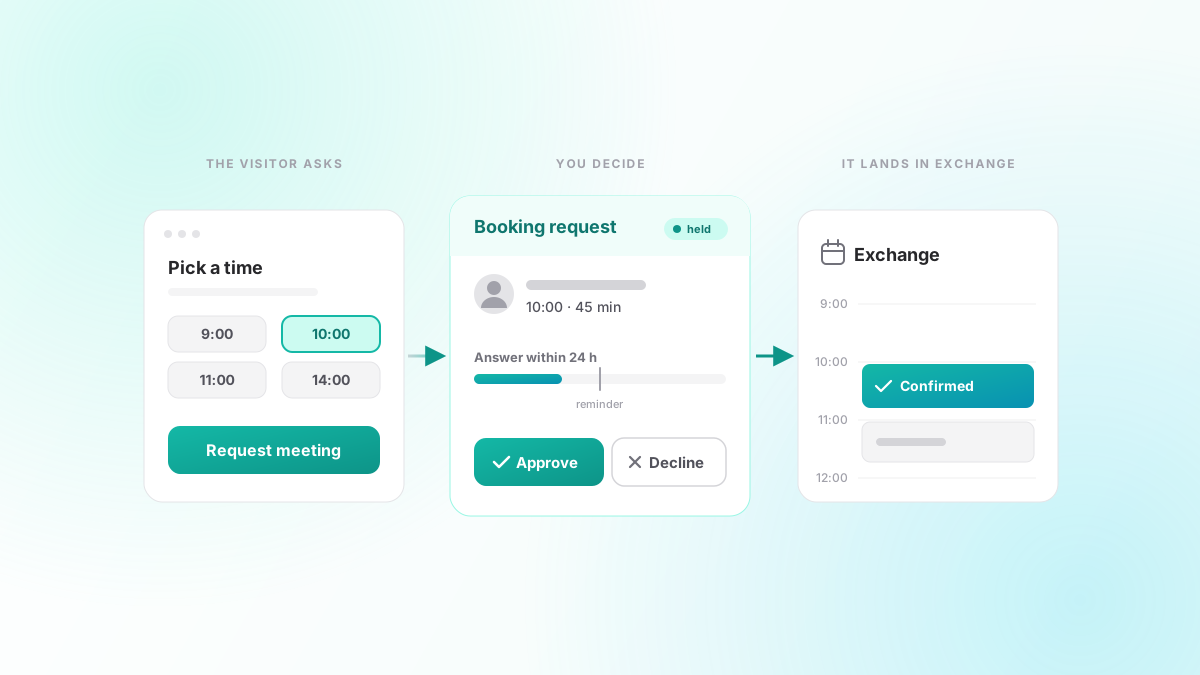
Four releases in three weeks, and a fair share of them is work you will never see: bookings that fail safely, integrations that sit out an outage instead of hammering it, and calendar sync that tells you when it has stopped. Around that, 1.12 to 1.15 add three things you will notice. You can hold a booking until you have agreed to it. You can connect a Microsoft Exchange server. And you can write the words at the top of your booking page yourself.
Approve a booking before it confirms
Some bookings you are happy to find in your week. Others you want to look at first: a new client, a two-hour session, anything where the answer might be "not this time". Until now, the only way to get that was to accept everything and cancel what you did not want, which is worse for everyone.
In 1.15 you can turn on approval for a meeting type. Open it, go to Booking Rules and tick "Confirm each booking myself". From then on, a booking on that meeting type is a request. The time is held so nobody else can take it, and you get an email with Approve and Decline buttons. Requests also appear in their own Requests tab on your meetings page, with a count, and stay out of Upcoming because they are not meetings yet.
The person booking is never left guessing. The button on the form says "Request meeting", the confirmation screen says the request was sent, and the email they get has no calendar invite attached. The invite arrives with the confirmation, once you have said yes. If you decline, the slot is released and they are told; you can add a note, which is quoted in that email.
Silence never means yes. Each meeting type has an answer window, 24 hours by default and anything from one hour to two weeks. You get one reminder halfway through. When the window runs out, the request lapses, the time is freed and the person who booked is told it expired, not that you refused. A request for a slot two hours away cannot wait 24 hours, so the deadline never runs past the meeting itself.
The held request also appears in your connected calendar straight away, marked tentative, so nothing else is booked over it. Approving turns it into a confirmed event; declining removes it. On a paid meeting type, the payment is taken first and refunded in full, automatically, if the request is declined, expires or is withdrawn.
Microsoft Exchange calendars
Tymeslot already synced with Google, Outlook, CalDAV and Apple iCloud. None of those reach an Exchange server that an organisation runs itself, and plenty still do. 1.14 adds one that does.
You connect it under Settings, Integrations, with the server's Exchange Web Services address (the one ending in /EWS/Exchange.asmx), a login and the mailbox address. Tymeslot asks Exchange for your busy time directly, so a weekly stand-up blocks every week on your booking page, not only the first one. Servers with a self-signed or internal certificate can connect too, if you choose to turn off certificate checking.
In 1.14 the connection was read-only: it blocked your times and showed your meetings on the dashboard. 1.15 completes it. Confirmed bookings are now written to your Exchange mailbox as appointments, and rescheduling or cancelling in Tymeslot updates or removes them there.
One thing to be clear on: this is for Exchange Server you host (2016, 2019 or Subscription Edition). A Microsoft 365 or Outlook.com mailbox still belongs on the Outlook Calendar integration.
Your words at the top of the booking page
Every booking page opens with a heading, a short greeting and a line telling the visitor what to do. Until 1.15 those came from the theme: "Let's Connect!" in one, "Schedule with" and your name in the other. Fine as defaults, but not how everyone talks.
You can now replace all three under Booking Page Text in your theme settings, with a live preview beside the form. Your wording stays when you switch theme. Turn it off again and the defaults come back, with your text kept for later. One trade to know about: the defaults are translated into the visitor's language, and your own wording is shown exactly as you wrote it, the same as your meeting type names.
Booking pages that open where the times are
Two smaller changes to the booking page itself, both from the same complaint: picking a time took too much looking.
Since 1.13.1, the booking calendar opens on the first day that has a free time, with that day's times already loaded. If you are booked out for the rest of the month, it moves forward to the next month that has room, instead of showing a grid of greyed-out days and leaving the visitor to work out why. A reschedule link lands on a bookable day in the same way. This one came in as a pull request from the community, as did adding a meeting's guests to webhook payloads.
In 1.14 you can also choose how far apart the start times on your booking page are. Until then they were spaced by the meeting's length, so a 45-minute meeting offered 9:00, 9:45, 10:30. You can now pick an interval per meeting type (from a short list, or any value between 5 minutes and 8 hours), and the times line up on your own clock: an hour apart means on the hour. Leave it unset and nothing changes. When a short interval fills the page with times, they are grouped by hour so the grid stays readable.
Quieter reliability work
1.12 and 1.13 were mostly about what happens when something goes wrong:
- A booking that creates a video meeting is confirmed exactly once, however slowly the provider returns the link.
- Booking is refused for a time your schedule never offered, even if someone submits it directly.
- An outage at a video provider trips a circuit breaker, and booking emails wait out a mail outage instead of being dropped.
- Account lockouts, password changes and social sign-ins are now recorded in the security log.
- A booking page that cannot load its times says so and asks the visitor to try again.
A run of calendar sync fixes
The 1.15 patch releases (1.15.1 to 1.15.8) are almost all calendar sync. The ones you are most likely to notice:
- Google Calendar now syncs every changed event, not just the first 250.
- CalDAV servers that require digest authentication can connect.
- A calendar that stops syncing shows as unhealthy, and you are emailed when a calendar or video connection needs reconnecting, including when Google or Outlook revokes access.
- While a calendar is waiting to be reconnected, bookings go to one that works.
- Calendars you have deselected stay out of search, the agenda and desktop reminders.
For self-hosters
Self-hosted installs get a few fixes of their own. Email no longer goes missing when the SMTP relay is slow or unreachable, and mail still goes out through a relay that offers no login, even with credentials set. The admin settings are grouped into tabs. And the Docker image now reads the values you set in /app/data/.env.
The full list is on the changelog. If there is something you would like to see next, tell us.