What's new in Tymeslot 1.4 to 1.6: one integrations page, colours that sync, and a live agenda

31 de julho de 2026 · 5 min de leitura
Three releases went out in July. 1.4 changed how you manage the things Tymeslot connects to and what you see when you open the dashboard. 1.5 and 1.6 were mostly for the people who run Tymeslot themselves. Here is what changed.
Every integration on one page
Until 1.4, calendars, video and payments each had their own corner of the dashboard. If a calendar had stopped syncing, you found out by visiting the calendar page, or by noticing a booking land on top of something.
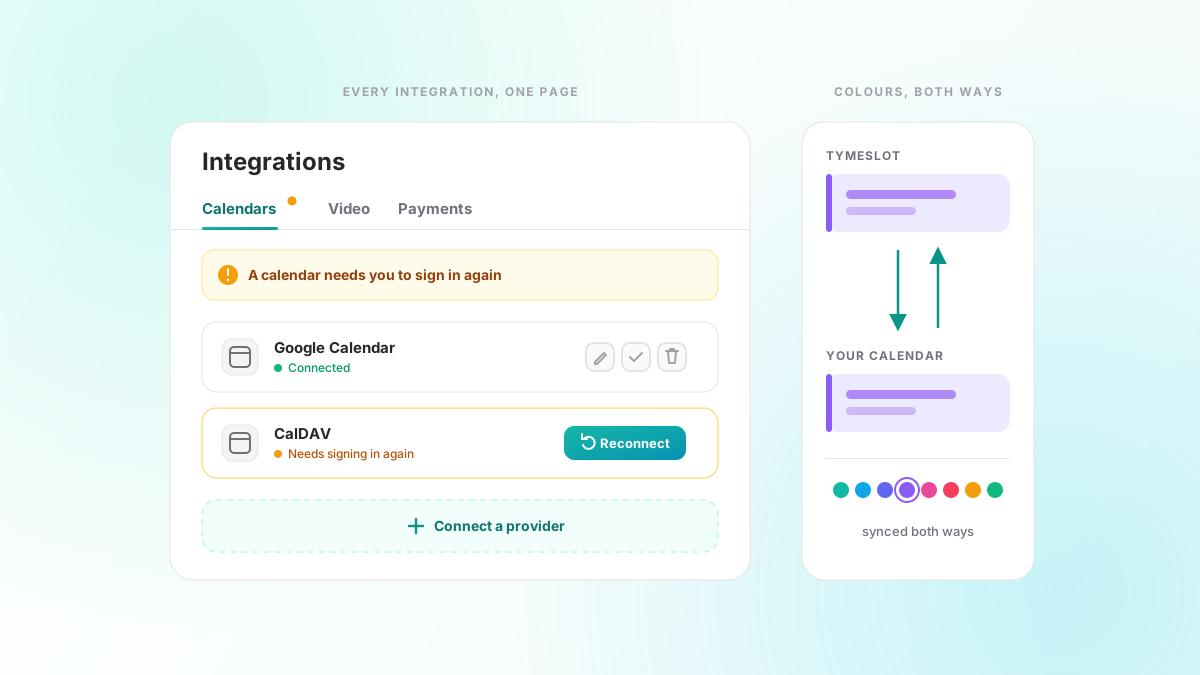
Now they share one page under Integrations, with a tab each for calendars, video and payments. Connecting a provider opens a picker, and the whole setup (credentials, finding your calendars, choosing which ones to use) happens in that window instead of on a separate page. Connected accounts sit in flat rows with their actions in view: reconnect, manage calendars, edit, test and delete are one click away.
The page also tells you when something is wrong. If a calendar or video account needs you to sign in again, or has stopped syncing, a banner at the top says so and the tab carries a status dot. A row that needs signing in again shows its Reconnect button straight away. Payments get the same treatment: an unfinished Stripe connection, or one Stripe is still reviewing, shows up here too.
Colours that travel both ways
1.3 let you give an event its own colour in Tymeslot. In 1.4 that colour stops at the border less often.
Colours now come in from your calendar. An event you coloured in Google Calendar or on a CalDAV server arrives in Tymeslot in the nearest of its eight palette colours. And when you recolour an event in Tymeslot, including one that was created elsewhere, the new colour goes back to the calendar it came from. Tymeslot sends only the colour, so the event's recurrence, guests, reminders and video details stay as they were. The colour you chose also survives the next sync.
Outlook has no per-event colour, so for Outlook calendars the colour stays in Tymeslot.
A dashboard that shows your day
The dashboard overview used to be a welcome banner and a list of upcoming meetings. In 1.4 it is an agenda. "Your day" puts your bookings and your synced calendar events on one timeline, with a line marking the current time and gaps of half an hour or more labelled as free time. Your next appointment sits on top with a live countdown, and a Join button appears ten minutes before it starts. Tomorrow's appointments follow underneath, and you can recolour an event from here as well.
Until your setup is finished, the overview also shows a short checklist: connect a calendar, add a video provider, customise your theme, review your meeting types and share your booking page. You can tick items off yourself or dismiss it.
For self-hosters
Most of 1.5 and 1.6 is for people running their own copy.
- The Docker image now honours
DATABASE_URL, so you can point it at any PostgreSQL 14 or newer, including a managed database over TLS (DATABASE_SSL=true). A newdocker-compose.with-postgres.ymlruns PostgreSQL in its own container. If an oldDATABASE_URLis lying around in your environment from another setup, read the upgrade note in the Docker README first, because 1.5 now acts on it. - A slim image (
luka1thb/tymeslot:slim) leaves out the bundled PostgreSQL server and is about 170 MB smaller. It needs an external database. - Email can now go through SendGrid, Mailgun or AhaSend, as well as SMTP and Postmark;
EMAIL_ADAPTERpicks the provider. Tymeslot checks the credentials at startup, and in production a misconfigured provider stops the app from booting instead of quietly dropping mail. - Since 1.4, stored integration credentials can be encrypted with their own
DATA_ENCRYPTION_KEYinstead of a key derived fromSECRET_KEY_BASE, so you can rotate the session secret without forcing everyone to reconnect their calendars. Existing installs keep working without it; the Docker and Cloudron READMEs explain how to switch over.
Pages also load faster for everyone: static assets are served zstd-compressed where the browser supports it, and the provider icons are now small WebP files instead of oversized PNGs.
Also in 1.4 to 1.6
- Meeting types in the dashboard show their description on the card.
- Booking pages no longer fail on the day the clocks change.
- Calendars you can only read, such as a shared calendar or a subscribed holiday calendar, are no longer offered as the place to put new bookings.
- Organisers and guests now get a video join link in their confirmation emails.
- Edits to Google Calendar events sync reliably, and CalDAV sync recovers from a calendar that has been emptied and from servers that are stricter about updates.
- Keyboard and screen-reader support improved across the booking pages and the dashboard.
The full list is on the changelog. As always, tell us what you want next.