What's new in Tymeslot 1.9 to 1.11: meeting polls, named schedules and a calendar-first dashboard

19. August 2026 · 5 Minuten Lesezeit
Three releases went out in under a week in August. Between them, Tymeslot learned to schedule a group, to keep more than one working week, and to open on the screen most people wanted first anyway. Here is what changed from 1.9 to 1.11.
Meeting polls, for when five people have to agree
A booking link works when one person picks a time from your calendar. It falls apart when five people have to agree on one. The usual fix is a thread of "does Thursday work for everyone?" messages that runs for days.
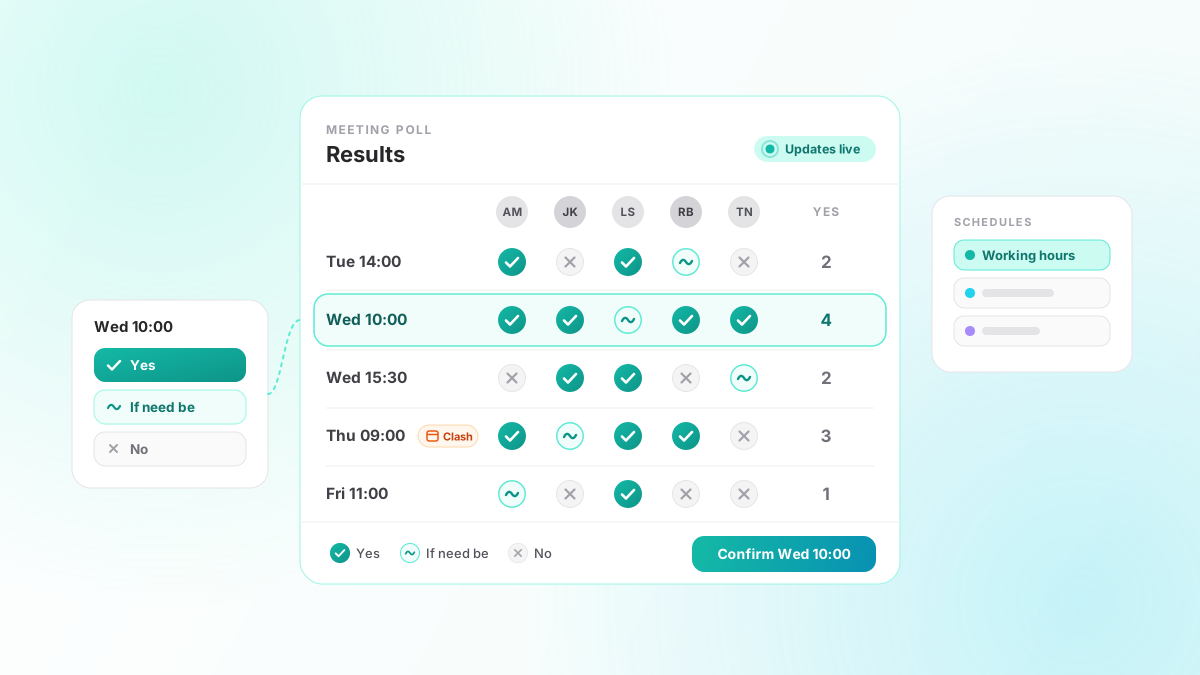
1.11 adds meeting polls. Under Dashboard, Polls, you give the poll a title, a duration and the times you want to offer (up to 40). You can attach one of your meeting types so the eventual meeting matches it, and you can set a voting deadline. Then you send one link to everyone.
Guests do not need an account. They enter a name and an email address, and mark each time Yes, If need be, or No. The middle answer matters more than it looks: without it, a time everyone could just about manage looks the same as one nobody can. Tallies update live as people answer, and anyone can change their answers until the poll closes. The voting page uses your booking page's theme and colours.
On your side, the results grid shows the times down one side and the guests across the top. Times that clash with something already on your calendar are flagged. There is no automatic winner; you pick one and confirm it. Tymeslot then books it as an ordinary meeting: it lands on your connected calendar, everyone who joined the poll is invited, and it can be rescheduled or cancelled like any other booking. If the slot was taken in the meantime, the confirmation is refused, so you are not double-booked.
A poll also does the chasing. You get a nudge once everyone has voted. If you set a deadline, anyone who registered but has not voted gets a reminder 24 hours before it, and you get another nudge when it passes.
Up to five schedules, one per kind of meeting
Until 1.10, you had one set of working hours, and every meeting type was booked against it. That is fine until your client calls belong in the afternoon and your evening consultations belong somewhere else entirely.
Availability is now built from named schedules. Each one carries its own weekly hours, breaks, and booking rules: the buffer between meetings, the minimum notice you need, and how far ahead people can book. Those three used to be account-wide settings; they now belong to the schedule, so each one can differ. You can keep up to five, shown as tabs in their own colours under Dashboard, Availability.
Every meeting type then follows the schedule you give it, under Booking Rules in the meeting type editor, or follows your default schedule if you leave it alone. Change a schedule's hours once and every meeting type pointing at it follows. Your connected calendars still apply on top: an event on your calendar removes a slot even if the schedule allows it.
Nothing to set up if one schedule suits you. On upgrade, your existing hours and rules became a default schedule called "Working hours", and every meeting type follows it.
The dashboard opens on your calendar
From 1.9, signing in takes you straight to your calendar instead of the overview page. Navigation moved out of the mode tabs and into the sidebar, where the overview still has its own entry.
The same release made calendar problems harder to miss, and less noisy. A connection that needs reconnecting now stays flagged until you reconnect it; before, a background token refresh could quietly clear the prompt while the sync kept failing. A CalDAV server that is down no longer raises a fresh admin alert on every sync cycle. And the Integrations badge in the sidebar now says which one is still missing, a calendar or a video provider, instead of only that something is.
For self-hosters
Two changes are for people running their own instance.
1.11 adds email branding to the admin settings. You can replace the logo at the top of every transactional email, the brand name used in the email copy, and the accent colour. Tymeslot derives the button and band shades from your accent so the text stays readable. This lives in the self-hosted admin area, so it does not apply on the managed service.
1.11.1 lets video integrations reach a meeting server on your private network. Outbound requests to private addresses are blocked by default as a security measure; set ALLOW_PRIVATE_IPS_FOR_VIDEO=true and self-hosted MiroTalk and the custom video link's test button can reach an internal host. It does not open calendars. The older calendar switch, ALLOW_PRIVATE_IPS_FOR_CALENDAR, still covers video too, so existing setups keep working.
Also in 1.9 to 1.11
- Rate limits no longer treat every visitor behind a reverse proxy as the same person, which could lock out new signups once a handful of verification emails had gone out.
- Webhook deliveries stop retrying when the endpoint rejects them outright (a 404, say), instead of burning through every attempt.
- Nextcloud calendars connect on installs served from a subdirectory.
- 1.10.1 is a security release: login redirects reject crafted targets that a browser would resolve off-site, and three dependency advisories are cleared.
- Opening an event with a reminder, or having a break rejected on the availability page, no longer crashes the page.
- The Cloudron package is now built on the Cloudron 5.1 base image.
The full list is on the changelog. If polls or schedules miss a case you have, tell us.