Calendar Sync
Two-way calendar sync that stops double-bookings. Connect Google Calendar, Outlook, Apple iCloud or any CalDAV server, such as Nextcloud or mailbox.org.
Connect Tymeslot to a Radicale CalDAV server: the server address to enter, your account login, and common self-hosted network setups.

Mis à jour le 19 août 2026
Radicale is a minimal, open-source CalDAV and CardDAV server written in Python. Self-hosters choose it for a simple calendar server with few dependencies and no groupware suite.
Radicale keeps each user's calendars directly under their username, for example /alice/. Tymeslot builds that path from the username you enter and lists every calendar it finds there.
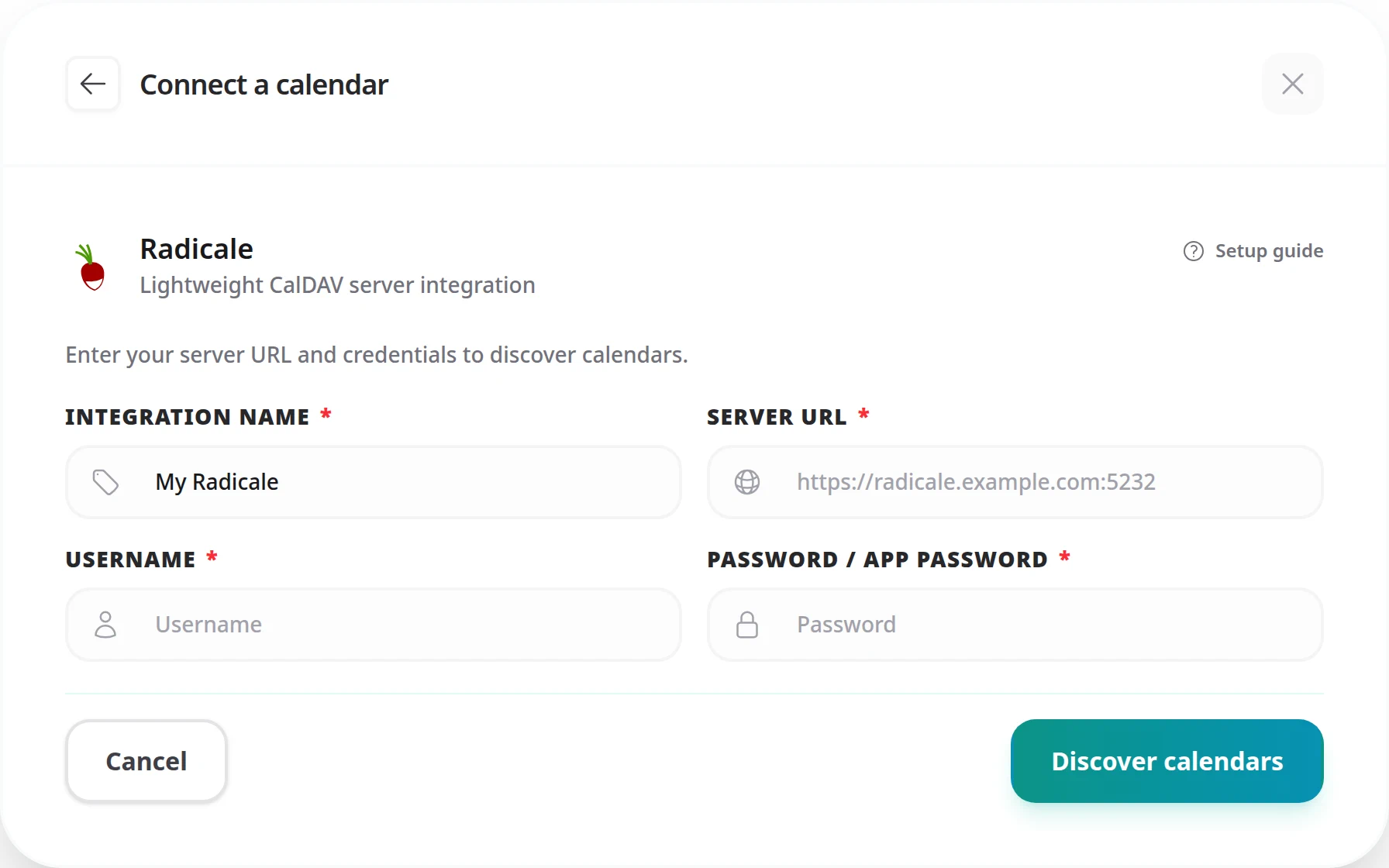
Enter the address of the Radicale server itself, the same one you open in your browser to reach Radicale's web interface:
https://radicale.example.com:5232/USERNAME/
itself. It is case-sensitive.
https://radicale.example.com/USERNAME/, also works. The plain server address is simpler and lets Tymeslot list all your calendars.
Radicale has no app passwords. Tymeslot signs in with your Radicale username and password, the same ones you use with any CalDAV client.
If Radicale is configured with
htpasswd
authentication, your password is the one set in the htpasswd file. If it uses LDAP or another backend, use the credentials for that backend.
"Resource not found" or "No calendars were discovered"
The usual causes are a username whose casing differs from your Radicale login, a missing sub-path (see below), or a user with no calendars yet. Radicale paths are case-sensitive, so check the username first.
"Authentication failed" or 401 Unauthorized
Check that the username and password match your Radicale configuration. If you use htpasswd,
regenerate the hash with
htpasswd -B /path/to/htpasswd USERNAME
to reset and confirm the credentials.
"Unable to connect to the calendar service"
Radicale must be reachable from wherever Tymeslot runs. Check that HTTPS is configured, that your reverse proxy forwards requests to Radicale, and that your firewall allows the port you entered (443 behind a proxy).
Self-hosting Tymeslot on that same network is the exception.
A host that resolves to a private address is refused by default, as protection against
server-side request forgery. Set
ALLOW_PRIVATE_IPS_FOR_CALENDAR=true
on your Tymeslot deployment to permit a CalDAV server on an internal network. This applies to
self-hosted installs only. On the managed service at tymeslot.app our servers have no route
to your network, so a private address cannot work there whatever you configure.
Radicale is behind a sub-path (e.g. /radicale/)
If a reverse proxy serves Radicale under a sub-path, include that prefix in the server URL:
https://example.com/radicale
No. The collection name is Radicale's internal identifier for a calendar, often a UUID when a calendar client created it. Tymeslot lists your calendars by display name after you click [Discover calendars], so you never have to type one.
Yes, and that is the recommended address. From the server root, Tymeslot looks
under your user's path (/USERNAME/) and lists every calendar it finds there.
On the managed service, no: it needs a publicly reachable server over HTTPS. Put Radicale behind a reverse proxy with a valid TLS certificate and a public DNS record; Caddy, or Nginx with Let's Encrypt, can issue the certificate for you.
If you self-host Tymeslot on the same network, yes. Set
ALLOW_PRIVATE_IPS_FOR_CALENDAR=true, and Tymeslot then accepts plain
http:// for a private IP address or an internal host name, such as a Docker
service name or a name ending in .local, .lan or .internal.
Two-way calendar sync that stops double-bookings. Connect Google Calendar, Outlook, Apple iCloud or any CalDAV server, such as Nextcloud or mailbox.org.
Sync Tymeslot with CalDAV calendars: Nextcloud, Radicale, Baikal, Zimbra, mailbox.org, iCloud and Fastmail. Conflict checks and new bookings work without a Google or Microsoft account.
Connect Tymeslot to Google Calendar. Busy, Tentative and Out of Office events all block bookings, so you are never double-booked, and every booking is added to your calendar.
Sync Tymeslot with Outlook Calendar via Microsoft Graph. Your Outlook events block conflicting bookings and every booking is added to your calendar. Works with Outlook.com and Microsoft 365.