What's new in Tymeslot 1.16 to 1.18: time off, a choice of meeting place, and three new video providers

25 вересня 2026 · 5 хвилин читання
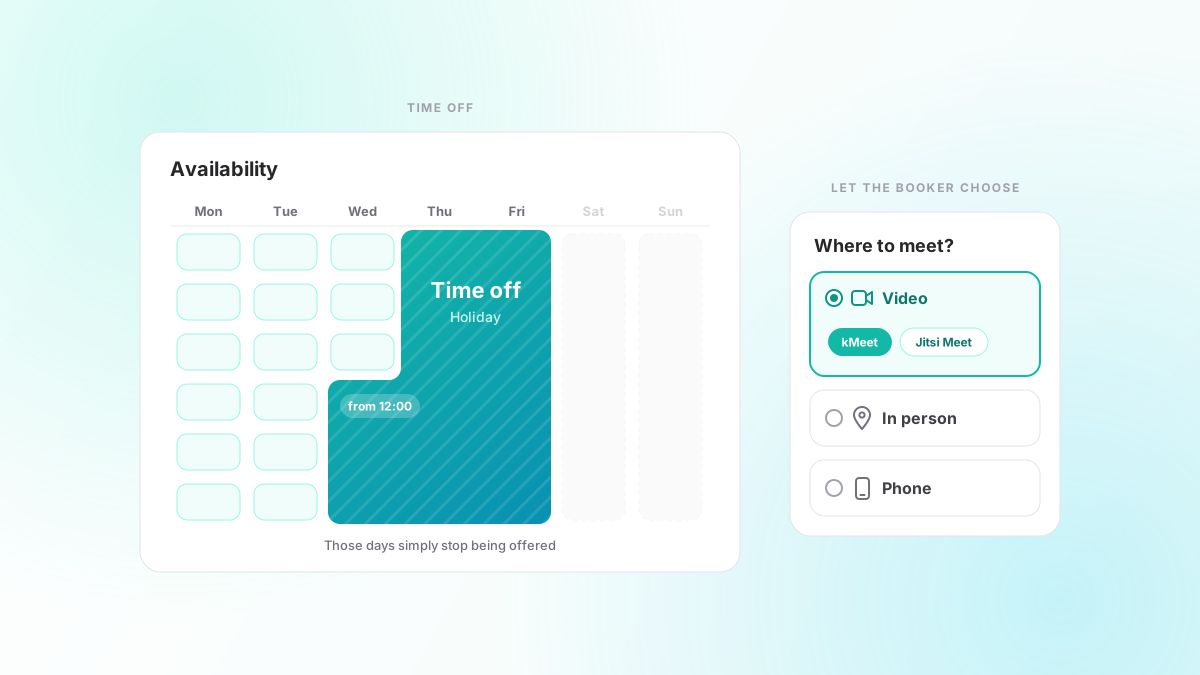
Three releases went out in the space of a week in September, 1.16, 1.17 and 1.18. Together they cover two things a host runs into sooner or later: going away for a while, and offering more than one way to meet. Here is what changed.
Time off, without a fake calendar event
Until 1.16, the way to stop people booking you during a holiday was to put a long blocking event in your calendar and hope it synced. It worked, but it meant your diary held an entry whose only job was to keep Tymeslot quiet, and if you forgot it, you came back to a week of bookings.
Time off now has its own place, on the Availability page. Add a period with a start and end date, and those days stop being offered. You can trim the first and last day with a time, so "leaving Friday at lunch, back Monday morning" is one entry, and give it a label for your own reference. Periods can be set up to two years ahead.
A period applies to every schedule and every meeting type you have, and it outranks any date override that says a day is available. Nobody booking you sees why the days are closed; they simply are not there.
If bookings already sit inside the period you add, Tymeslot tells you how many. It does not cancel them. They stay in your diary until you move or cancel them yourself, because a save that quietly cancelled meetings on your behalf would be far worse than one that warned you.
Let the booker choose where to meet
Before 1.18, a meeting type had one location. If you were happy to meet in person, on a call or by video, you either made three meeting types or picked one and explained the rest in the description.
A meeting type can now carry a list of locations, and with two or more on the list the booker chooses. Each option is one of four kinds:
- Video, tied to one or more of your connected video integrations. Give it several and the booker also picks the service.
- In person, with the address.
- Phone, either with a number for the booker to call or asking the booker for theirs.
- Custom, with whatever text you want to show.
The choice comes back when someone reschedules. The reschedule form opens on the location the meeting already has, and the booker can switch, say from your office to a video call, without cancelling and booking again. If the switch moves the meeting off one video service, the old room is deleted and a new one is created where it needs to be, and the reschedule email carries the new join link.
kMeet, Jitsi Meet and Nextcloud Talk
1.17 adds three video providers, all of them ones you can use without handing your meetings to one of the large platforms.
- kMeet, Infomaniak's Jitsi-based service, needs no setup at all: every booking gets its own room on kmeet.infomaniak.com.
- Jitsi Meet points at your own Jitsi server. If the server uses token authentication, give Tymeslot the App ID and secret and every join link carries its own token, renewed when the booking moves.
- Nextcloud Talk creates a public conversation on your Nextcloud for each booking, using your login name and an app password. If you have already connected the same Nextcloud as a calendar, the form offers to copy the details across. Guests join from the link without a Nextcloud account and wait in the lobby until the meeting starts. The conversation is deleted when the booking is cancelled, and about a week after the meeting ends.
They sit alongside Google Meet, Microsoft Teams, Zoom, MiroTalk and custom links, and any of them can be one of the options a booker chooses between.
Rescheduling keeps what the booking had
A reschedule used to lose things on the way. 1.16 and 1.17 fix most of them. A rescheduled booking now stays on the meeting type it was booked as, carries the booker's answers to your questions across, and keeps its video room. Zoom meetings and Jitsi links move with it. Guests and the host are told about the new time, and the calendars stay in step.
Guests themselves get reminders now, too. Until 1.16.1 the reminders a meeting type sends went to you and the booker only, which left out the people most likely to forget. A guest's reminder carries the time, the join link and their own RSVP links. Guests who declined are left alone.
Also in 1.16 to 1.18
- Signing in and signing up no longer reveal whether an email address has an account. An unverified account fails sign-in exactly like a wrong password, and the real owner of an address can reclaim an account someone else signed up with by resetting its password.
- Large CalDAV calendars, and ones after a bulk import, sync without running the server out of memory.
- Editing a calendar event from the dashboard keeps its attendees, reminders and repeat rule, and editing one occurrence no longer changes the rest of a CalDAV series.
- Times you have already booked are no longer offered.
- Microsoft Teams bookings no longer confirm without a join link.
- Pages follow a change of browser language, and the timezone picker finds cities typed without their accents.
- For self-hosters: email reaches SMTP relays that negotiate TLS 1.3, and admin alerts warn when calendar connections start failing across many accounts.
- On the managed service, Pro access carries on while a failed payment is being retried.
The full list is on the changelog. As always, tell us what you want next.