What's new in Tymeslot 1.19 to 1.22: saved locations, guests on existing bookings, and recurring series

2 octobre 2026 · 6 min de lecture
Four releases went out in the space of a week, from 1.19 to 1.22. Most of what changed sits in places a host touches every day: where a meeting happens, who is invited to it, and what happens when you edit an event that repeats. There is also a new language and a fair amount of privacy work. Here is what changed.
Save your venues once, let bookers pick
If you meet people in person, the address used to be something you typed into each meeting type, or arranged by email after the booking came in. If you had two offices, you had two meeting types.
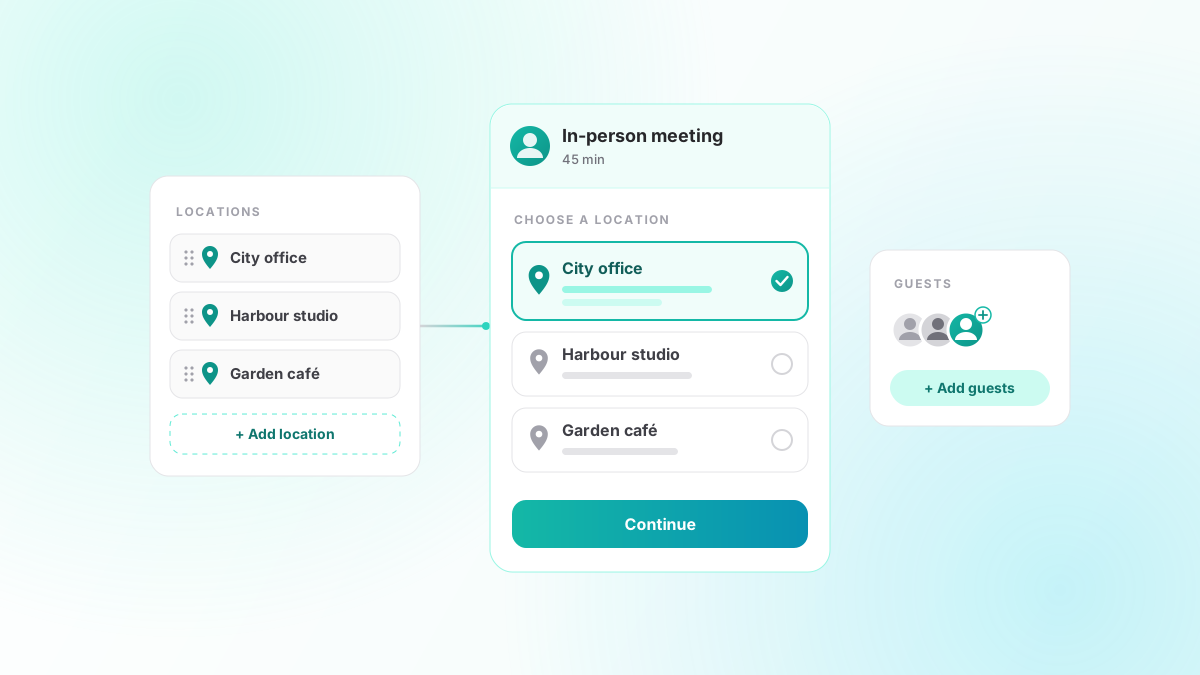
1.22 adds a Locations page to the dashboard. Save each place you meet with a name and, if you like, the address and directions. You can reorder them, edit them and delete them there, or add a new one straight from the meeting type editor without leaving the form.
An in-person meeting type then lists the saved locations it offers. With one, the booker is told where the meeting is. With several, the booker picks one on the booking page. With none, the address is arranged after booking, as before. The meeting keeps a copy of the location it was booked at, so editing or deleting a location later never rewrites a past meeting.
Add guests to a booking that already exists
Someone books a call, and the day before, they ask whether a colleague can join. Until now, the answer meant forwarding the invitation by hand.
From 1.20, you can add guests to an existing booking from the bookings dashboard. Paste in one or more email addresses (commas, spaces or new lines all work) and each new guest gets an invitation email of their own. Guests already on the booking are not emailed again. A booking can have up to ten guests, and you can add them to a confirmed booking, with no reschedule pending, up until the meeting starts. This works whether or not the meeting type lets bookers bring guests; that setting covers the public booking form, not whom you invite to your own meeting.
Quick add in the dashboard calendar picked up the same idea: a meeting you create there can include a note to the guest and invite extra guests, in a language you choose. And booking cards now list each reminder email and whether it has gone out yet, so you can see at a glance what the attendee will receive.
Recurring events, edited as a series
The dashboard calendar has let you create repeating events since 1.3, but changing one afterwards was blunt. 1.19 asks the question every calendar app asks: when you edit a recurring event, does the change apply to this event, this and the following events, or all of them? Deleting one asks whether to remove only that event or the whole series. And you can move a recurring event to another calendar, which takes the whole series with it.
This works for Google, Outlook and the CalDAV family (Apple iCloud, Nextcloud, mailbox.org and the rest). Exchange has no way to write part of a series, so there an edit applies to the single event and the wider choices are not offered. A series can move between calendars of the same kind, Google to Google or CalDAV to CalDAV, but not across them.
Deleting an event and choosing to notify attendees now actually emails them a cancellation; before, nobody was told. Deleting an event someone else organised no longer sends a cancellation to its organiser and guests on your behalf.
Tymeslot now speaks Polish
1.21 adds Polish to the booking pages, the emails and the dashboard, alongside English, German, French, Italian, Czech and Ukrainian. On the managed service, the tymeslot.app website and subscription pages are in Polish too.
The same release fixes something that had been English-only all along: the booking title in calendar events and emails. The host now sees it in their language, and each guest in theirs.
A privacy and security pass
Much of 1.22 is about what Tymeslot keeps and shares, with a start made in 1.19 and 1.21:
- Uploaded profile pictures and backgrounds no longer publish the photo's location, capture time or device. Files uploaded before the update are cleaned once, on the first start after upgrading.
- Webhook URLs, custom meeting links, and poll, RSVP and free/busy links are now stored encrypted.
- Guests' calendar invitations no longer include the booker's email address, message or booking-form answers.
- Events in the host's calendar no longer carry the booking's cancel code, which anyone who could see the event could have used to cancel it.
- Booking and sign-up pages load Google's reCAPTCHA only once a visitor starts filling in the form, and a reCAPTCHA outage no longer stops bookings going through.
- Booking pages and emails no longer load their fonts from Google; Tymeslot serves them itself.
- Logs and analytics keep less: email recipients and subjects are no longer logged, link tokens stay out of both, and visitors' IP addresses are no longer kept without limit.
For self-hosters
From 1.19, Tymeslot records unexpected errors, crashes and failed background jobs in its own database and emails admins when a new error appears, or an old one comes back. Credentials, tokens, cookies and email addresses are redacted before anything is stored, and errors not seen for 30 days are resolved and later deleted. If you would rather store nothing, set ERROR_TRACKING_ENABLED=false and errors are only logged.
From 1.22, self-hosted instances no longer contact data.iana.org at startup and every week to check for time zone updates. 1.21 moves to Elixir 1.20.4 and Erlang 28.5, with no configuration changes.
Also in these releases
- Rescheduling a booking now moves the event in an iCloud calendar, instead of leaving it at the old time.
- Events deleted in Google Calendar disappear from the dashboard calendar, instead of lingering.
- Events created on a CalDAV account are saved to the calendar you picked, not the default one.
- Moving an event to another calendar no longer deletes its video room.
- The booking page no longer offers times an hour out in Manitoba and the Northwest Territories from 1 November 2026.
The full list is on the changelog. As always, tell us what you want next.