What's new in Tymeslot 1.7 and 1.8: calendar feeds, booking limits, and six languages

12 серпня 2026 · 5 хвилин читання
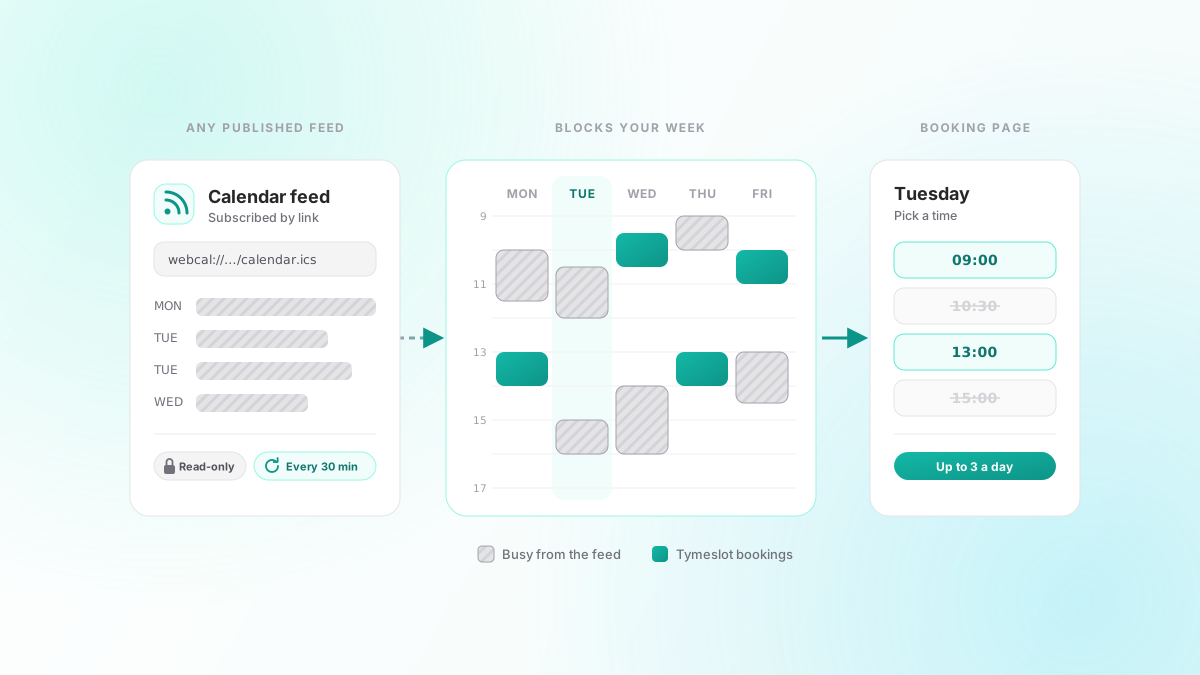
Three releases went out in quick succession at the start of August: 1.7.0, 1.8.0 and a 1.8.1 a couple of days later. Between them they fix three things hosts kept working around. A calendar that Tymeslot could not connect to still could not block your booking page. There was no way to say "that's enough meetings for this week". And outside the booking page, most of the app only spoke English. Here is what changed.
Any calendar feed can now block your availability
Tymeslot connects to Google, Outlook, Apple iCloud and CalDAV servers. That covers most calendars, but not all of them. A room-booking system, a shared team calendar you can only see through a link, a work calendar your IT department will not let you connect with full access: all of these tend to offer one thing, a published feed URL.
1.7 lets you subscribe to one. Paste the link (Google's secret address in iCal format, Outlook's published calendar link, a webcal:// address from Apple or anywhere else) and Tymeslot treats the events in it as busy time. They block slots on your booking page and show up in the calendar grid like the rest of your events.
A subscription is read-only, and on purpose. Tymeslot never writes to the feed, and it never offers a subscribed calendar as the place new bookings are saved. It refreshes the feed every 30 minutes and keeps the last copy it fetched, so if the publisher's server goes down for an afternoon your availability stays as it was instead of opening up. If the link stops working because it was revoked or rotated, Tymeslot flags the subscription so you can paste a new one.
Cap how many bookings you take
An open booking page has no sense of when you have had enough. If ten people want Tuesday, ten people get Tuesday.
1.8 adds booking limits: a maximum number of bookings per day, per week and per month. You can set them across your whole account in your meeting settings, on a single meeting type, or both. A slot is offered only while every cap that applies to it still has room, so a limit of three intro calls a day can sit inside a limit of fifteen meetings a week. Leave a field empty and there is no cap.
Days, weeks and months are counted in your own timezone, with weeks starting on Monday. The limits count Tymeslot bookings only. Events in your connected calendars already block the times they occupy, and they do not use up your allowance.
Invoices for paid bookings
If you take payment when someone books, your attendee used to get a Stripe card receipt and nothing more. That is fine until they need to expense the meeting.
From 1.7, every paid booking comes with an invoice. Payments go straight to your own Stripe account, so Stripe issues the invoice in your name and under your own tax settings. There is nothing to switch on.
On tymeslot.app, the same release adds an invoice list to the subscription page, so you can download your own Tymeslot invoices without going through the billing portal.
Tymeslot in six languages
Booking pages and booking emails have been available in German, French, Italian and Ukrainian for a while. The dashboard, onboarding and account settings mostly were not, so a host whose visitors saw their own language spent their own day in English.
1.8 translates the whole app, from onboarding to the dashboard, the account settings and the emails Tymeslot sends you, and adds Czech, which makes six languages with English. Your account settings now have a language picker. Leave it on automatic and Tymeslot follows your browser. Emails go out in the language of the person reading them, not the person who triggered them. 1.8.1 followed with a review of every translation in all five languages, correcting the strings that read like a first draft.
On tymeslot.app, the public website is now available in the same languages.
A meeting type editor you don't have to scroll
The meeting type form had grown one section at a time until editing a meeting type meant scrolling through all of them. In 1.8.1, editing a meeting type opens on five tabs: Details, Location & Calendar, Booking Rules, Questions and Reminders. A tab with a problem in it is marked, so you can see where to look before you save. Creating a new meeting type still shows everything on one page, so nothing is skipped the first time.
Also in 1.7 and 1.8
- Each calendar inside a connected account now has its own colour and its own show or hide toggle in the calendar grid, so a work account with five calendars no longer shows up as one block of colour.
- When you disconnect a video provider, you can choose to delete the meeting rooms it created as well. By default they stay, because their links are already in your attendees' invites.
- Moving a booking now sends its own rescheduled email, which shows the new time next to the old one. The invite attached to it replaces the existing calendar entry instead of adding a second one.
- A reschedule could stop webhooks, Slack and Telegram alerts and reminders from going out. That is fixed in 1.8.1.
- CalDAV sync no longer stalls or drops events on stricter servers, including servers that track changes by sync token.
- Recurring events keep their local time across daylight-saving changes, and booking times are correct for the 2026 clock changes in Morocco and Alberta.
The full list is on the changelog. If your calendar setup still needs a workaround, tell us what it is.