All Tymeslot features
Scheduling, calendar and video integrations, payments, automation and embedding: everything Tymeslot does, on one page.
Give every booking its own public Talk conversation on your Nextcloud. Guests join from the link without an account and wait in the lobby until the meeting starts.

Оновлено 23 вересня 2026
By the end of this guide, Tymeslot will create a Nextcloud Talk conversation on your own Nextcloud for every booking. The conversation follows its booking: it moves when the booking is rescheduled, and it is deleted when the booking is cancelled or about a week after the meeting has ended.
https://. Tymeslot calls it whenever a booking is made, rescheduled or cancelled.
If your user may not create conversations, or public conversations need a password, Nextcloud refuses every new conversation. The booking is still confirmed, but without a video link.
A Nextcloud reachable only on an internal network cannot be used.
Self-hosting Tymeslot on that same network is the exception.
A host that resolves to a private address is refused by default, as protection against
server-side request forgery. Set
ALLOW_PRIVATE_IPS_FOR_VIDEO=true
on your Tymeslot deployment to permit a Nextcloud server on an internal network. This applies to
self-hosted installs only. On the managed service at tymeslot.app our servers have no route
to your network, so a private address cannot work there whatever you configure.
Tymeslot sends your app password with every request, so the server address must start with https://. The only exception is a server at
localhost
or a private IP address, which a self-hosted Tymeslot with that switch may reach over http://.
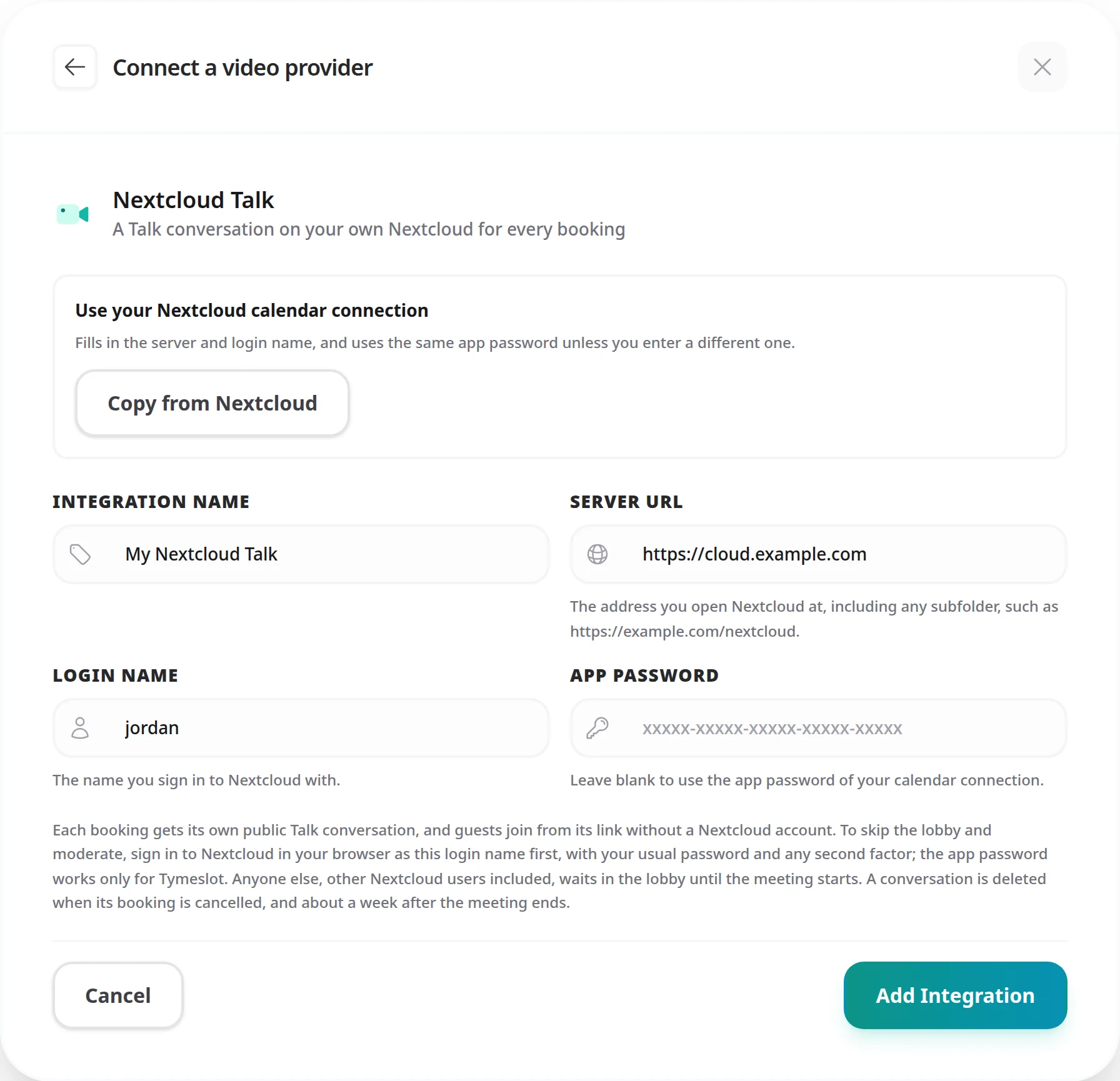
When someone books, Tymeslot signs in to your Nextcloud with the login name and app password you gave it and creates a public Talk conversation named after the booking. The confirmation emails carry its link, which looks like this:
https://cloud.example.com/index.php/call/…
You and your guest receive the same link. Your guest opens it in a browser, enters a name and joins as a guest, without a Nextcloud account.
The conversation is created with its lobby switched on until the meeting's start time. Anyone who arrives early waits in the lobby, and Talk lets everyone in when the meeting is due to start.
The Nextcloud account you connect creates each conversation, so Talk makes that account its owner. An owner skips the lobby and has Talk's moderator controls, including switching the lobby off early.
To skip the lobby and moderate, open the link in a browser where you are signed in to Nextcloud as the connected login name. Sign in there with your usual password and any second factor; the app password works only for Tymeslot, and Nextcloud's own login form refuses it. Anyone else, other users of your Nextcloud included, waits in the lobby until the meeting starts; opened while signed out, the same link makes you an ordinary guest too. If you connect an account other than your own, such as a shared one, that account owns the conversations.
An app password lets Tymeslot sign in without your main Nextcloud password. Once two-factor authentication is on for your account, your login password stops working for Tymeslot and an app password is required. Even without two-factor authentication, use one: you can revoke it on its own, without changing your main password.
The Nextcloud calendar guide walks through the same screen. If you already connected your Nextcloud calendar, you can reuse its app password in the next step instead of creating a new one.
https://cloud.example.com
or
https://example.com/nextcloud
Before saving, Tymeslot signs in to your Nextcloud and checks that Talk is available and recent enough. It refuses to save if Nextcloud rejects the login name or app password, if Talk is missing or older than 21.1, or if the same login on the same server is already connected. Connecting a different login on the same Nextcloud is fine.
Expected result: the integration appears in your list of video integrations under the name you gave it (My Nextcloud Talk by default), with your login name and server host beside it.
With a Nextcloud calendar connected, click its Copy from … button to fill in Server URL and Login name. Leave App password blank to use the calendar connection's app password, or enter a different one.
http://
to https://
or to another host, open Nextcloud in your browser and enter the address you end up on, starting with https://.
Each meeting type chooses its own video providers. Repeat these steps for every meeting type that should use Nextcloud Talk:
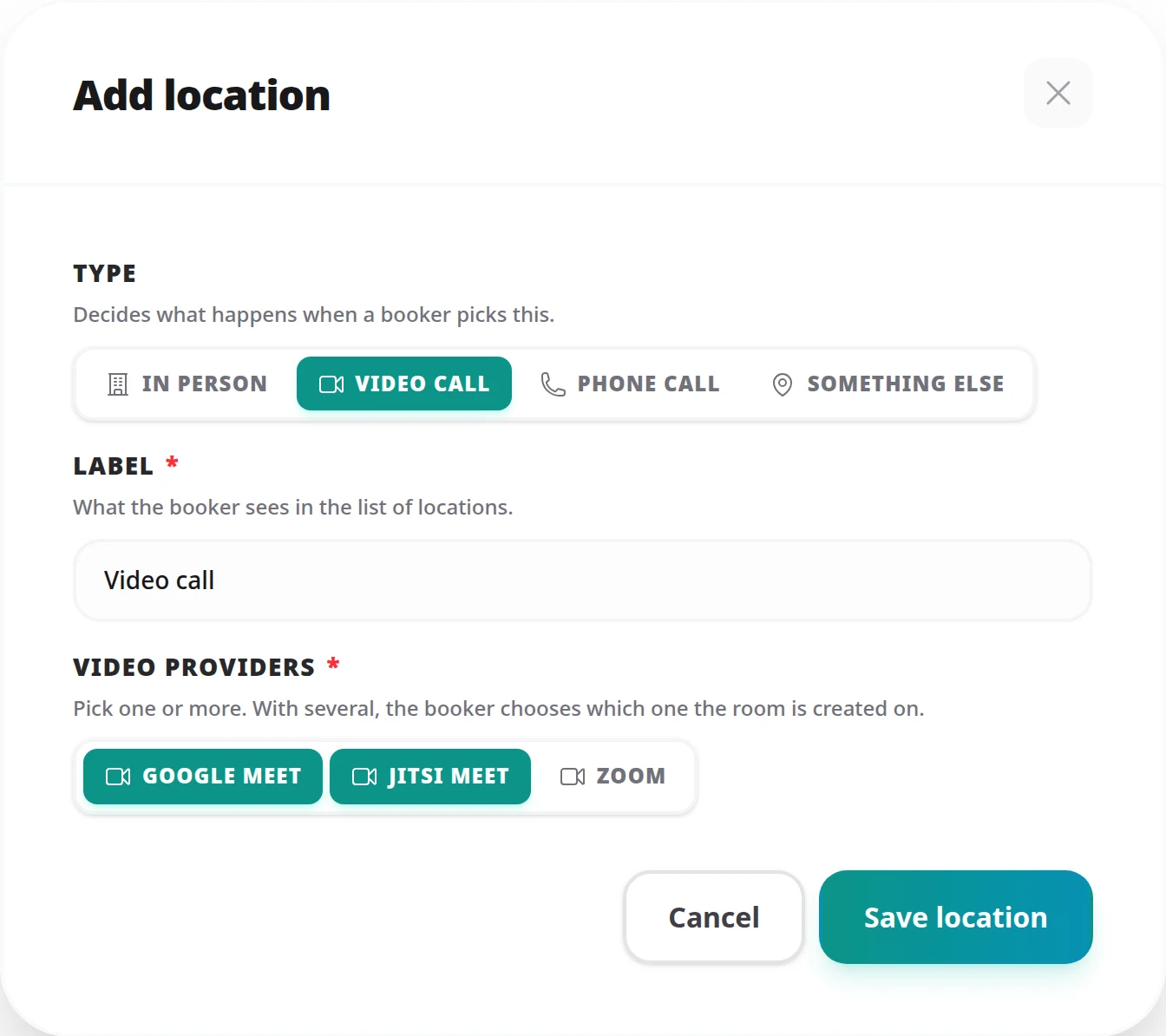
Expected result: the next booking that uses this location carries the link to its own Talk conversation.
You can tick several providers on the same location, for example Nextcloud Talk alongside Google Meet or Zoom. The person booking then chooses which one the room is created on. See Meeting Locations for everything a meeting type's locations can do.
VIDEO_ROOM_RETENTION_DAYS; see the Environment Variables Reference.
Talk refuses to delete a conversation marked to be kept. Tymeslot leaves such a conversation in place and does not try again; delete it yourself in Talk when you no longer need it.
While the integration still has conversations on your Nextcloud, past meetings' included, the delete dialog says how many and offers Also delete these conversations from your Nextcloud server. Ticking it deletes all of them, and attendees of upcoming meetings find their join link no longer works.
Leave it unticked and the conversations stay on your Nextcloud, so upcoming meetings keep working. Tymeslot can only delete them again once you connect Nextcloud Talk with the same login: its nightly clean-up then deletes those of cancelled bookings, and those of ended meetings whose deletion date passed no more than 30 days earlier.
If Nextcloud stops accepting the app password, for example because it was revoked, Tymeslot stops using it at once instead of trying again. Nextcloud counts every refused sign-in against the address it came from and starts slowing that address down, so repeated attempts would only make things worse.
Tymeslot shows a Reconnect badge on the integration on your dashboard, with the reason beside it, and emails you. Until you fix it:
To fix it, create a new app password in Nextcloud, click Edit integration (the pencil) on the integration and enter it in App password. Tymeslot checks it against your Nextcloud before saving, and a successful check clears the notice. If Nextcloud has moved to a new address, change Server URL as well. When editing, leaving App password blank keeps the one already stored, except when Server URL points to a different server (another host, port or scheme): Tymeslot never sends a stored app password to a server it was not given for, so enter it again. A new subfolder on the same server keeps the stored one.
No. The conversation is public, so anyone with the link can open it in a browser, enter a name and join as a guest.
Only while two-factor authentication is off for your account; once it is on, Nextcloud accepts only an app password. An app password is the better choice either way, because you can revoke it without changing the password you sign in with.
Tymeslot deletes a booking's conversation when the booking is cancelled, and about a week after the meeting has ended (seven days by default). See What Happens to the Conversation above.
No. The lobby holds them until the start time. If you want to start early, open the conversation signed in to Nextcloud as the connected account and switch the lobby off in the conversation's settings.
Nextcloud is slowing down requests from Tymeslot's address, usually after too many failed sign-ins. Wait a few minutes, check the login name and app password, and try again.
/index.php/call/
Nextcloud and Nextcloud Talk are trademarks of Nextcloud GmbH. Tymeslot is not affiliated with Nextcloud GmbH.
Scheduling, calendar and video integrations, payments, automation and embedding: everything Tymeslot does, on one page.
Auto-create Google Meet rooms for every confirmed booking via the Calendar API. Attendees receive the link by email and can join without a Google account.
Auto-create Microsoft Teams meetings for every confirmed booking. Covers the Graph permissions Tymeslot asks for, when a tenant admin has to consent, and what happens when an account cannot host meetings.
Auto-create Zoom meetings for every confirmed booking. Connects over OAuth. Use a paid plan (Pro, Business or Enterprise): Zoom applies its free-plan limits, including meeting length, to meetings created this way.