Widget Embedding
Embed the Tymeslot booking widget as an inline section, popup, or floating button. Works with WordPress, Webflow, Wix, Squarespace, Shopify, and custom HTML.
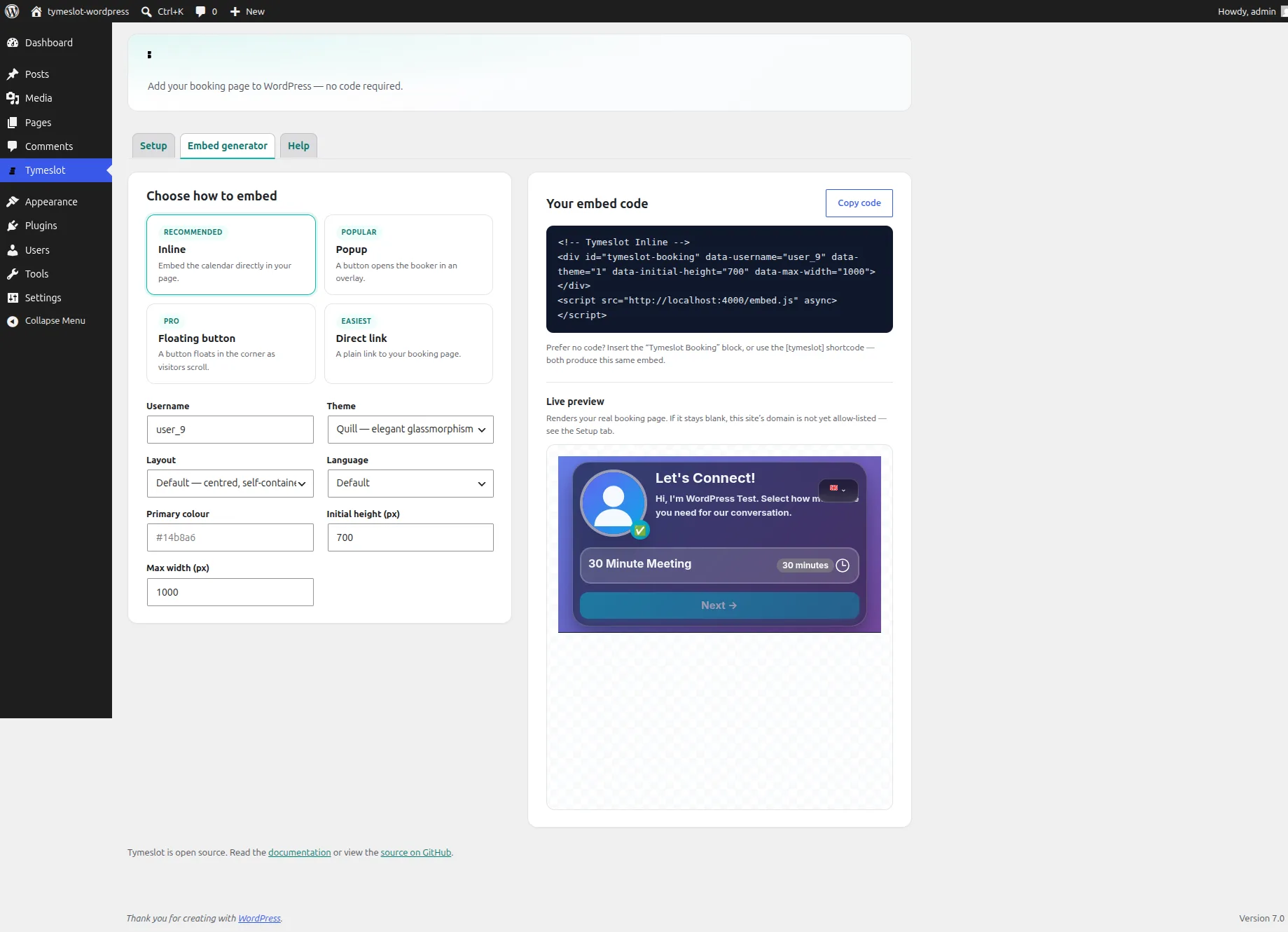
Add your Tymeslot booking page to WordPress with the official plugin, as a Gutenberg block, a shortcode or a floating button. There is no HTML to paste, and the plugin produces the same embed code as your dashboard.

Zaktualizowano: 30 czerwca 2026
The Tymeslot plugin is free, open source and listed in the official WordPress.org plugin directory. Install it from your WordPress admin, or get the source on GitHub.
Prefer a manual install? Download
tymeslot.zip
from the
WordPress.org listing
(or a tagged build from
GitHub releases
) and upload it under Plugins → Add New Plugin → Upload Plugin.
Open Tymeslot → Setup and choose where your account lives:
Then set your booking username, the handle in your booking URL,
e.g. tymeslot.app/your-handle.
Every block and shortcode inherits this unless you override it.
The plugin's Setup tab has a live embedding status check: it loads your real booking page from inside WordPress and tells you whether this site is allow-listed yet.
There are three ways, and all produce the same embed:
In the editor, insert the Tymeslot Booking block and configure it in the sidebar: mode (inline, popup, floating or link), theme, layout, language and size. The editor shows a placeholder; your booking page appears on the published page.
Add the shortcode to any post, page or widget:
[tymeslot username="your-handle" mode="inline"]
Supported attributes: username,
mode
(inline / popup / floating / link), theme, layout, locale, height, width, and label.
Prefer to paste a snippet into a page builder or custom theme? Tymeslot → Embed generator builds the same snippet your Tymeslot dashboard produces, with a live preview and a copy button.
Choose a theme (the design of your booking page), a layout (column for a wide canvas, or default for a centred card), and a language. Set defaults once on the Setup tab, or override them per block and shortcode.
'unsafe-inline'
in your
script-src
(or a nonce/hash).
Not on WordPress, or want the raw snippets for any platform? See the Widget Embedding guide, which covers Webflow, Wix, Squarespace, Shopify, and custom HTML.
Embed the Tymeslot booking widget as an inline section, popup, or floating button. Works with WordPress, Webflow, Wix, Squarespace, Shopify, and custom HTML.