Docker Self-Hosting
Deploy Tymeslot with Docker Compose on any VPS or home server. Includes reverse proxy setup, file upload volumes, and WebSocket configuration for LiveView.
Promote your first admin, run the /admin UI, and toggle runtime settings without editing environment variables or restarting the container.

Updated June 24, 2026
Admins are regular Tymeslot users with one extra flag — is_admin = true. Once promoted, a user gains access to /admin, where they can:
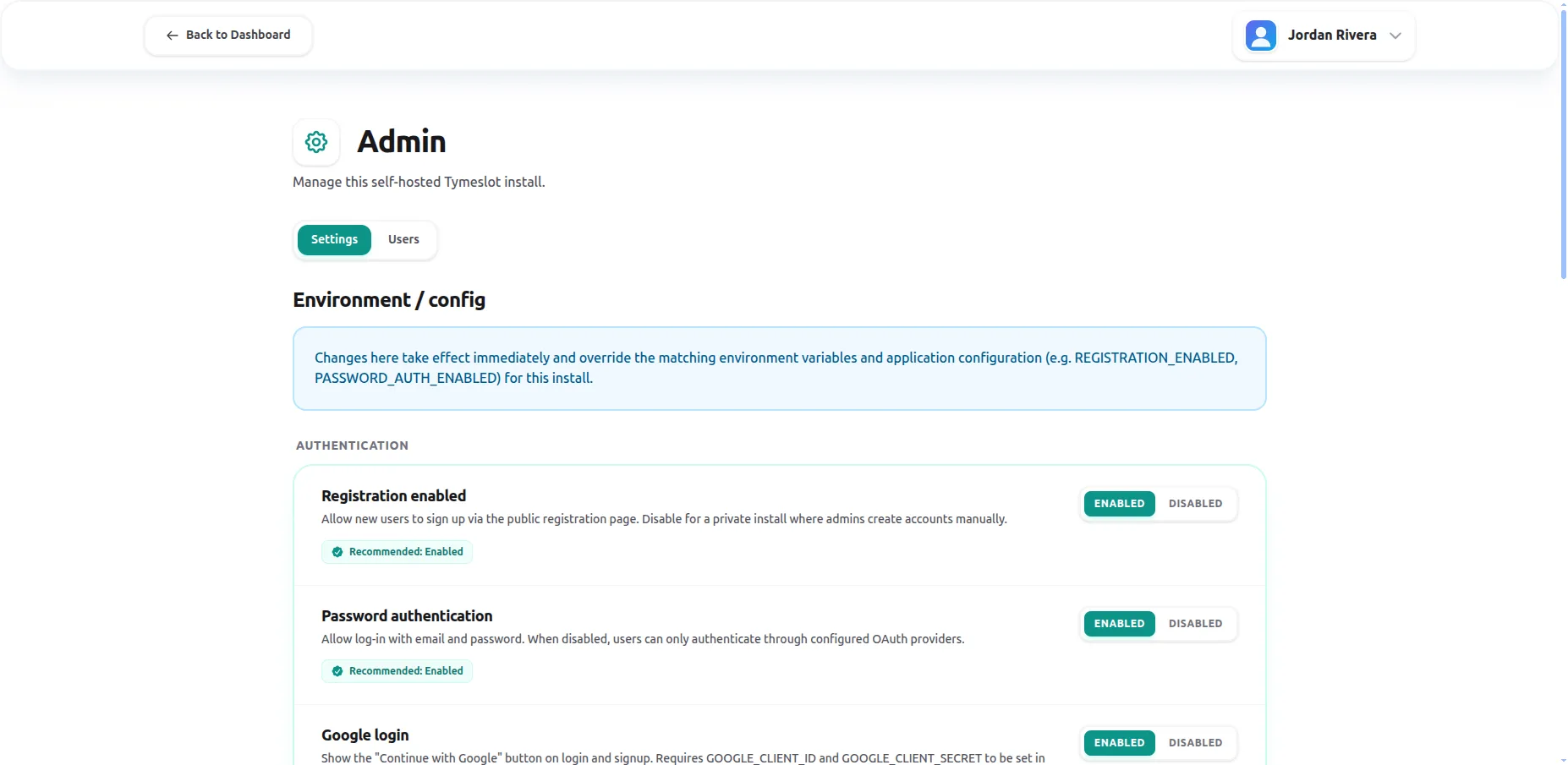
/admin
settings page — runtime toggles that override environment variables without a restart.
/admin
— the route is locked down with a 404 by design, since settings are managed centrally there. This guide applies only to self-hosted deployments.
On a brand-new install, the
first user to register is automatically promoted to admin
— but only when the
users
table is empty at the moment of registration. As soon as any user exists (even one created during an earlier deployment), auto-promotion is permanently off.
Fresh install
First user signs up via email or OAuth and becomes admin automatically. No mix task required.
Existing install / upgrade
Auto-promotion never triggers. Use a mix task or release helper (below) to promote an existing user.
Pick the snippet that matches how you deployed Tymeslot. Each command takes the email of an already-registered user — the task does not create accounts.
From the host machine where
docker-compose
runs:
docker-compose exec tymeslot \
bin/tymeslot rpc 'Tymeslot.Release.promote_admin("you@example.com")'Open Apps → Tymeslot → Terminal in the Cloudron dashboard, then:
bin/tymeslot rpc 'Tymeslot.Release.promote_admin("you@example.com")'
From your laptop you can also use the Cloudron CLI:
cloudron exec --app tymeslot.yourdomain.com -- bin/tymeslot rpc '...'
.
From the project root (or with the Railway CLI linked to the service):
railway run bin/tymeslot rpc 'Tymeslot.Release.promote_admin("you@example.com")'
Running Tymeslot directly from the source tree (mix phx.server)?
The mix task is the most convenient route:
mix tymeslot.promote_admin you@example.comThe mix task and the release helper share an implementation, so they produce identical results.
bin/tymeslot rpc
runs the call against the already-running
Tymeslot node — fast and recommended for live containers. Use
bin/tymeslot eval
only when the application is not running (for example, a one-shot maintenance container).
Symmetric to promotion. The same command pattern works for every deployment target — swap
promote_admin
for demote_admin:
# Docker / Cloudron / Railway
bin/tymeslot rpc 'Tymeslot.Release.demote_admin("former-admin@example.com")'

# Source install
mix tymeslot.demote_admin former-admin@example.comVerify which users hold admin status at any time:
# Production / release builds\nbin/tymeslot rpc 'Tymeslot.Release.list_admins()'\n\n# Source install\niex -S mix -e 'IO.inspect(Tymeslot.Release.list_admins())'
Output is a list of
%{id: integer, email: string}
maps, one per admin user.
Visit
/admin/settings
while signed in as an admin. Each toggle shows a
source badge
telling you where the current value is coming from, so you always know whether you're looking at a runtime override or a value baked into your deployment.
database
You (or another admin) set this value from the UI. Survives restarts. Click Reset to drop the override.
config
Coming from an environment variable like
REGISTRATION_ENABLED
. The UI can still override it.
default
No env var, no override — the built-in default applies.
database override (admin UI)\n ↓ falls back to\nenvironment variable (e.g. REGISTRATION_ENABLED)\n ↓ falls back to\nbuilt-in defaultResetting a setting from the UI clears the database override and restores whichever of the lower layers wins — that's usually the env var if one is set, otherwise the built-in default.
REGISTRATION_ENABLED=false
.
PASSWORD_AUTH_ENABLED
.
The full list of environment variables (including those not exposed in the UI) lives in the Environment Variables Reference .
If every admin has been demoted or deleted on an install that still has users, the mix task is the way back. It does not require an admin — only shell access to the server:
docker-compose exec tymeslot \
bin/tymeslot rpc 'Tymeslot.Release.promote_admin("you@example.com")'If the application itself won't start, you can promote an admin directly in PostgreSQL. Reserve this for genuine emergencies — the mix task is preferred because it goes through the same code path the UI uses:
docker-compose exec -T postgres psql -U tymeslot tymeslot <<'SQL'\nUPDATE users SET is_admin = true WHERE email = 'you@example.com';\nSQL
ADMIN_EMAIL
variable. Admin status lives in the database and is changed only through the mix task, the release helper, the admin UI, or — as above — direct SQL. The deliberate constraint is that anyone who can flip an env var should not be able to silently grant themselves admin in a multi-tenant deployment.
Three reasons, in order of likelihood: (1) you are not signed in as an admin user — the route returns a 404 to non-admins by design so the scope is invisible; (2) you're on the managed SaaS, which disables the admin UI entirely; (3) the
enable_admin_ui
config flag has been set to
false
for this deployment. On a Core self-hosted instance, sign out and back in once after running the promotion command so the new admin flag is loaded into your session.
Yes — there is no built-in cap. Run the promote command once per email. The
/admin/users
page lets existing admins promote and demote each other directly from the UI once at least one admin exists.
The env var stays where it is — the UI writes a database override that takes precedence at runtime. If you later click
Reset
on that setting, the override is cleared and the env var (or the built-in default) takes over again on the next read. No
.env
file is ever edited.
Admin promotions, demotions, and setting changes are logged via the standard application logger with the actor's user ID. There is no separate audit-log UI today — operators rely on JSON log aggregation. If you need richer audit history, run a log shipper against the application logs and filter on the
Admin
namespace.
The promotion succeeded — but your existing browser session still holds the pre-promotion user record. Sign out, sign back in, and reload /admin. If the 404 persists, confirm the promotion took effect with
bin/tymeslot rpc 'Tymeslot.Release.list_admins()'
and verify that
enable_admin_ui
is not set to
false
in your deployment's configuration.
bin/tymeslot rpc 'Tymeslot.Release.list_admins()'
returns at least one entry.
/admin
gets a 404, not a 403 — that's intentional.
/admin/settings
shows a database, config, or default
badge that matches your deployment.
Deploy Tymeslot with Docker Compose on any VPS or home server. Includes reverse proxy setup, file upload volumes, and WebSocket configuration for LiveView.
Install Tymeslot on Cloudron in minutes. PostgreSQL, SSL certificates, email relay, and automatic updates are all provisioned and managed for you.
Deploy Tymeslot to Railway with one click. PostgreSQL is provisioned and connected automatically — set two environment variables and your instance is live.