Back to Overview

Meeting Payments

Charge attendees through Stripe when they book a paid event type — setup, refunds, payouts, and the fine print.

Luka Breitig — Technical Product Builder & AI Developer
Luka Breitig

Technical Product Builder & AI Developer

Get paid the moment someone books

Meeting payments let you charge attendees at the moment they book a paid event type. Payment is taken before the slot is confirmed — no payment, no booking — and funds settle directly into your Stripe account on your existing payout schedule. Tymeslot never holds your money.

Requirements

Meeting payments are available to Pro plans on the managed cloud (tymeslot.app). To take payments you need:

  • An active Tymeslot Pro subscription. Trials count.
  • A Stripe account in a supported country — connected to Tymeslot via Stripe Connect (Standard). Personal and business accounts both work.
  • Identity verification completed on Stripe — until Stripe enables charges on your account, paid event types stay locked.

Self-hosting?

Meeting payments are also available when self-hosting Core. Setup is different — you act as your own Stripe platform. See the Self-host notes section below.

🔌 Setup walkthrough

The whole setup takes under five minutes once your Stripe account is verified.
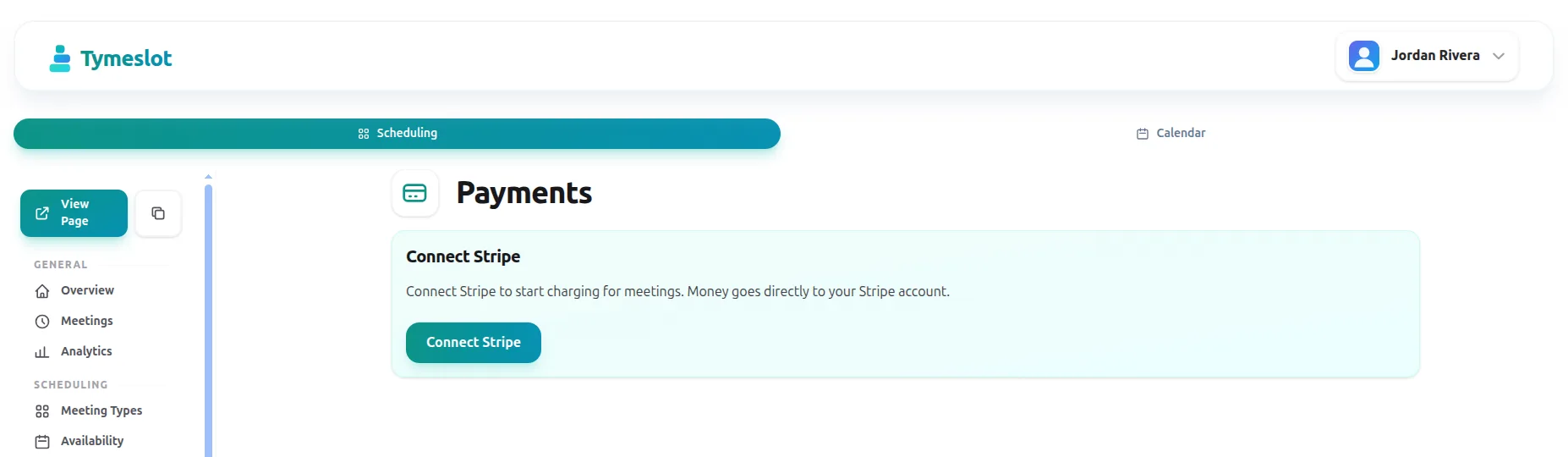
1

Open Dashboard → Payments

You will see a Connect Stripe button. Click it to start Stripe's onboarding flow in a new tab.

2

Complete Stripe onboarding

Sign in to an existing Stripe account or create one. Stripe collects business and bank details directly — Tymeslot never sees them.

3

Pick your currency

Defaults to your Stripe account currency. You can change it once on the Payments dashboard. All paid event types use this currency.

4

Turn on payment on an event type

Edit any event type, tick Require payment , and set a price. Save — the next attendee pays through Stripe Checkout before the slot is confirmed.

💱 Pricing and currencies

One currency per host. Each event type carries its own price (whole units — €25, £40, $200, and so on).

  • 13 currencies supported: EUR, USD, GBP, CHF, SEK, NOK, DKK, PLN, CZK, HUF, CAD, AUD, NZD.
  • Minimum prices apply — Stripe requires a small minimum per currency (roughly €0.50 / $0.50 / £0.30). Tymeslot enforces these at save time.
  • Changing currency resets prices — to keep things unambiguous, switching currency clears all event-type prices. Existing paid bookings keep the price they were charged with.

🏦 Payouts

Funds flow directly from the attendee to your Stripe account. Tymeslot is never in the middle.

  • Direct charges via Stripe Connect Standard. The platform fee is carved off; the rest goes to your balance.
  • Your existing Stripe payout schedule applies — daily, weekly, or monthly to the bank account on your Stripe profile. Configure it in your Stripe dashboard.
  • No payout from Tymeslot — we never hold your funds, so there is nothing for us to release.

↩️ Refunds

Issue a refund from the Payments dashboard. Pick a payment, choose full or partial, confirm.

  • Full or partial. Multiple partial refunds are allowed up to the total charged.
  • Attendee is notified by email with the refund amount and an itemised Stripe receipt.
  • 60-day window for application-fee refunds. After 60 days Stripe stops refunding the platform fee; the customer-facing refund still works.

Refunds settle on Stripe's clock

Stripe forwards the refund to the attendee's bank — typical settlement is 5–10 business days for cards.

🔁 Cancellations and reschedules

Both flows are designed to keep payment state in sync without surprises.

  • Cancel with refund. When you cancel a paid booking from the dashboard, you can refund the attendee in the same step.
  • Cancel without refund. The booking is cancelled; the payment is retained. The attendee is notified by email.
  • Free reschedules. When an attendee reschedules a paid booking, the existing payment moves to the new slot. No second charge, no Stripe round-trip.
  • Attendee abandons checkout. If the attendee closes Stripe Checkout, the held slot expires automatically — no manual cleanup.

⚠️ Disputes and chargebacks

A small share of payments will, eventually, be disputed by the cardholder. Tymeslot surfaces the dispute and keeps you in the loop, but Stripe owns the resolution.

  • Disputes appear on the Payments dashboard as soon as Stripe notifies us.
  • Respond directly in Stripe. Use your Stripe dashboard to upload evidence; the deadlines and outcome are managed there.
  • Lost disputes deduct funds from your balance. Tymeslot does not refund or rebate the platform fee on lost disputes.

Excessive disputes

Stripe can restrict charges on accounts with persistently high dispute rates. We will email you the moment Stripe flags your account so you can act on it.

💰 Fees

Two fees apply to every paid booking on the managed cloud:

  • Stripe processing fees — charged by Stripe directly. Typical rates are 1.5%–2.9% + a fixed amount per transaction, depending on country and card.
  • Tymeslot platform fee — 0.5% (50 basis points) of the booking amount. Rounded up to the nearest cent, with a 1-cent floor.
  • No fees on free bookings. The 0.5% applies only when payment is collected.
  • Refunded application fees on refunds issued within 60 days of the original charge.

Self-host notes

Core ships with the platform fee set to 0 basis points. Self-hosters can register their instance as a Stripe platform and set their own fee via the MEETING_PAYMENTS_APPLICATION_FEE_BP environment variable. See the self-host README for details.

Frequently Asked Questions

Can I use my existing Stripe account?
Yes. Stripe Connect adds Tymeslot as a connected platform to your existing account. You keep your branding, your customer data, and your existing balance — and you can still take payments outside Tymeslot.
Does Tymeslot hold any of my money?
No. Stripe Connect Standard uses direct charges, so funds flow from the attendee's card straight into your Stripe balance. Tymeslot only takes a 0.5% application fee that Stripe routes to the platform at charge time.
Which payment methods do attendees see?
Whatever you have enabled on your Stripe account. Card, Apple Pay, Google Pay, and Link are on by default for most regions; SEPA, iDEAL, Bancontact, and others can be enabled in Stripe.
What happens if a host loses Pro mid-month?
Payment for existing paid bookings still goes through, you can still refund and cancel them from the dashboard, and your Stripe account stays connected. Only new paid event types are blocked while Pro is inactive.
Can I disconnect Stripe?
Yes. Open Dashboard → Payments and use Disconnect. The connection is soft-deleted, paid event types are turned off, and historical payments stay readable.
How are refunds taxed?
Stripe's refund moves money back to the attendee gross of any tax you collected. Talk to your accountant about how that interacts with VAT/GST in your jurisdiction — Tymeslot does not provide tax advice.
Why is there a minimum price?
Stripe charges a fixed fee per transaction. Below the minimum, your Stripe fees would exceed the booking amount. The minimums match Stripe's published thresholds per currency.