Sync Tymeslot with Google Calendar
Connect Tymeslot to Google Calendar. Real-time conflict detection respects Busy, Tentative, and Out of Office events — no double-bookings, automatic event creation.
A unified calendar view for all your connected accounts — see bookings and synced events together in one place.

Updated June 24, 2026
The dashboard calendar pulls together every event from every connected account — Google Calendar, Outlook, CalDAV, Nextcloud — and displays them in a single grid. Bookings you receive through Tymeslot appear alongside your existing events, so you always see the full picture.
Switch between three layouts depending on how much detail you need.
Day
Hour-by-hour breakdown of a single day. Best for a packed schedule where individual slots matter.
Week
The default view. Seven columns of time slots — gives a clear picture of how the week is shaping up.
Month
High-level overview of the full month. Each day shows a condensed list of events. Optional ISO week numbers in the left margin.
Navigate with the arrows in the toolbar to move forward or back. Click Today to return to the current date.
Each connected calendar integration appears as a colour-coded source. You can hide individual calendars without disconnecting them — useful when one account is noisy but you still need it for availability checks.
Open the settings modal (gear icon) to adjust how the calendar behaves for your account.
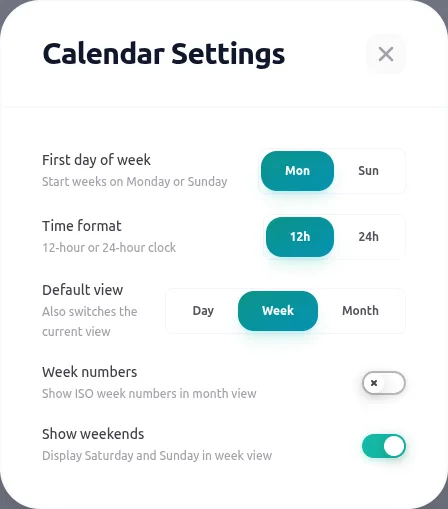
Default view
Which view loads when you open the dashboard: Day, Week, or Month.
Time format
12-hour (9:00 AM) or 24-hour (09:00) clock display.
Week starts on
Monday or Sunday — the first column in week view and month view grid.
Show weekends
Hide Saturday and Sunday columns in week view for a cleaner Mon–Fri layout.
Week numbers
Show ISO week numbers in the left margin of month view — handy for project planning.
Connect Tymeslot to Google Calendar. Real-time conflict detection respects Busy, Tentative, and Out of Office events — no double-bookings, automatic event creation.
Sync Tymeslot with Outlook Calendar via Microsoft Graph. Real-time conflict detection and automatic event creation — works with Outlook.com and Microsoft 365.
Sync Tymeslot with CalDAV calendars — Nextcloud, Radicale, Baikal, Zimbra, mailbox.org, iCloud, and Fastmail. Real-time conflict detection with no Google or Microsoft dependency.